Port Settings — POP, IMAP, and SMTP
What Are These Settings For?
If you want to access your SmarterMail account from a third-party email client like Mozilla Thunderbird, Outlook, Spark, or Apple Mail, you’ll need to configure it with the correct server settings. This page contains everything you need.
IMAP Settings
Use IMAP if you want your emails to stay synced across multiple devices. Changes made on one device (reading, deleting, moving) are reflected everywhere.
| Setting | Value |
|---|---|
| Username | Your full email address (e.g. [email protected]) |
| Password | Your email password |
| IMAP Server | Your mail host address (e.g. mail.nathanael.llc) |
| IMAP Port | 993 |
| Encryption | SSL/TLS |
| Authentication Method | Modern Auth / OAuth2 |
POP Settings
Use POP if you only access your email from one device and prefer to download messages locally. Unlike IMAP, POP typically removes messages from the server after downloading.
| Setting | Value |
|---|---|
| POP Server | Your mail host address (e.g. mail.nathanael.llc) |
| POP Port | 995 |
| Encryption | SSL/TLS |
| Authentication Method | Modern Auth / OAuth2 |
SMTP Settings
SMTP is used for sending email. This applies regardless of whether you’re using IMAP or POP for incoming mail.
| Setting | Value |
|---|---|
| SMTP Server | Your mail host address (e.g. mail.nathanael.llc) |
| SMTP Port | 587 |
| Encryption | STARTTLS |
| Authentication Method | Modern Auth / OAuth2 |
Two-Factor Authentication & App Passwords
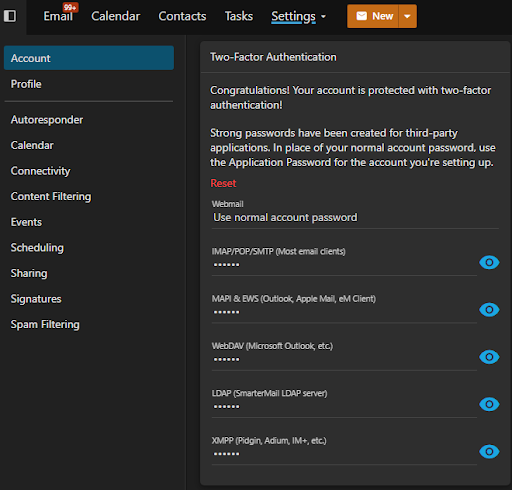
If you have two-factor authentication (2FA) enabled on your account, most third-party mail clients won’t be able to log in using your regular password. You’ll need to generate a dedicated app-specific password instead.
To find yours, go to Settings → Account in SmarterMail and look for the app password section.
Note
App passwords bypass 2FA for a specific app only — your main account password and 2FA setup remain unchanged. Treat app passwords like regular passwords and don’t share them.
IMAP vs POP — Which Should I Use?
Use IMAP if you check your email on more than one device (phone, laptop, desktop). Everything stays in sync.
Use POP only if you exclusively use one device and want to store your mail locally. Just be aware that once downloaded, messages may be removed from the server depending on your client’s settings.